React NativeのTextInputのクオート変換を防ぐ(iOS)
React Native(Expo)のE2Eを書いていた所、真っすぐなクオート"(U+0022)が曲がったクオート“(U+201C)・”(U+201D)に変換されていることに気づきました。今回はその原因と対応を残しておきます。
## 問題
React NativeのTextInputを使った部分を、iOSのシミュレーターでE2Eテストしていた所、とおるはずのテストがとおりませんでした。
10分ぐらいしてようやく"(真っすぐなクオート)と入力したはずの部分が“や”(曲がったクオート)に変わっていたことに気が付きました。
## 原因
これはiOSの「スマート句読点」機能によるものでした。
参考:react native - Override/Disable iOS Smart Punctuation in TextInput - Stack Overflow
## 対応
TextInputをkeyboardType="ascii-capable"に指定すれば変換を無効化できます。iOSはこのタイプのキーボード表示だと無効化してくれるようです。
## 実際に試したコンポーネント
実際にどういうことが試せるコンポーネントを書いてみました。
自分の知っている限りだとクオートの他に--や...も変換されるようなのでascii-capableで無効化できるか試してみました。
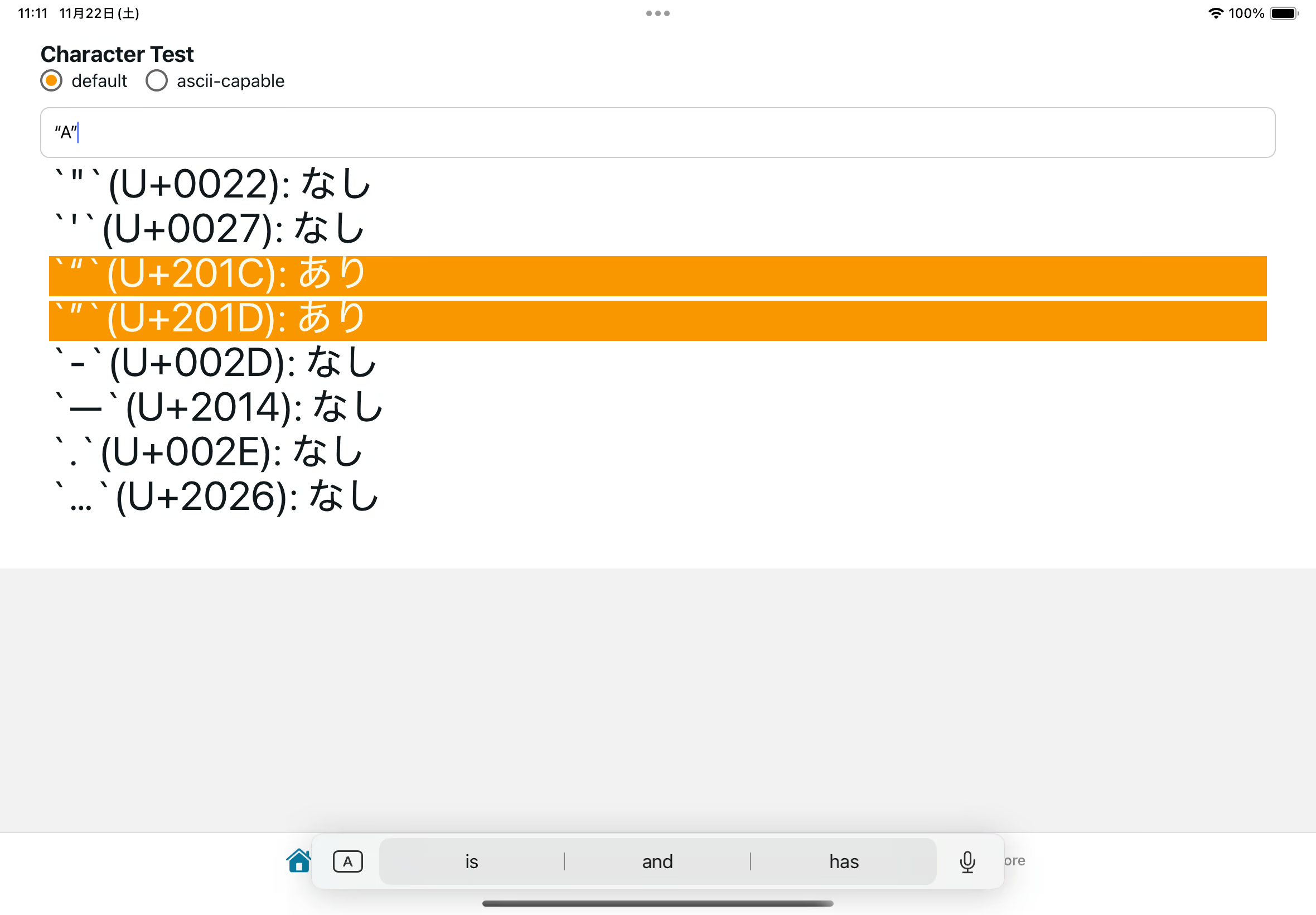
結果、"・--・...の変換はちゃんと無効化できました。
import {  StyleSheet,  TextInput,  TouchableOpacity,  Keyboard,} from "react-native";import { useState } from "react";import { ThemedText } from "@/components/themed-text";import { ThemedView } from "@/components/themed-view";
type KeyboardType = "default" | "ascii-capable";
export default function HomeScreen() {  const [inputValue, setInputValue] = useState("");  const [keyboardType, setKeyboardType] = useState<KeyboardType>("default");
  const checkChars = ['"', "'", "“", "”", "-", "—", ".", "…"];
  const handleKeyboardTypeChange = (type: KeyboardType) => {    Keyboard.dismiss();    setKeyboardType(type);    setInputValue("");  };
  const getUnicodeLabel = (char: string) => {    const codePoint = char      .codePointAt(0)      ?.toString(16)      .toUpperCase()      .padStart(4, "0");    return `\`${char}\`(U+${codePoint})`;  };
  return (    <ThemedView style={styles.mainContainer}>      <ThemedText type="subtitle">Character Test</ThemedText>
      <ThemedView style={styles.radioContainer}>        <TouchableOpacity          style={styles.radioButton}          onPress={() => handleKeyboardTypeChange("default")}        >          <ThemedView style={styles.radioCircle}>            {keyboardType === "default" && (              <ThemedView style={styles.radioSelected} />            )}          </ThemedView>          <ThemedText>default</ThemedText>        </TouchableOpacity>
        <TouchableOpacity          style={styles.radioButton}          onPress={() => handleKeyboardTypeChange("ascii-capable")}        >          <ThemedView style={styles.radioCircle}>            {keyboardType === "ascii-capable" && (              <ThemedView style={styles.radioSelected} />            )}          </ThemedView>          <ThemedText>ascii-capable</ThemedText>        </TouchableOpacity>      </ThemedView>
      <TextInput        style={styles.input}        value={inputValue}        onChangeText={setInputValue}        placeholder="Enter text here"        keyboardType={keyboardType}      />      <ThemedView style={styles.resultContainer}>        {checkChars.map((char) => {          const hasChar = inputValue.includes(char);          return (            <ThemedText              key={char}              style={[styles.bigText, hasChar && styles.highlight]}            >              {`${getUnicodeLabel(char)}: ${hasChar ? "あり" : "なし"}`}            </ThemedText>          );        })}      </ThemedView>    </ThemedView>  );}
const styles = StyleSheet.create({  input: {    borderWidth: 1,    borderColor: "#ccc",    borderRadius: 8,    padding: 12,    fontSize: 16,  },  mainContainer: {    marginTop: 24,    padding: 36,  },  resultContainer: {    gap: 4,    padding: 8,  },  bigText: {    lineHeight: 36,    fontSize: 36,  },  highlight: {    backgroundColor: "#f99700",    color: "#fdf9e8",  },  radioContainer: {    flexDirection: "row",    gap: 16,    marginBottom: 12,  },  radioButton: {    flexDirection: "row",    alignItems: "center",    gap: 8,  },  radioCircle: {    width: 20,    height: 20,    borderRadius: 10,    borderWidth: 2,    borderColor: "#666",    alignItems: "center",    justifyContent: "center",  },  radioSelected: {    width: 10,    height: 10,    borderRadius: 5,    backgroundColor: "#f99700",  },});
以上、TextInputでの自動変換の無効化でした。対応は簡単ですが、そもそも勝手に変換されていることに気づくのに時間がかかりました。過去の自分にドンマイ。
クオートクオート言ってますが二重引用符という名前があるらしい。